

Discord is hands down the world’s most popular gaming chat platform that allows anyone on the app to create a server for any reason. These Discord servers come with text chat, video call, voice chat, and video streaming capabilities that facilitate seamless communication with friends and sharing of movies, games, and videos with other active users.
However, created Discord servers need to be updated with the help of a Discord Server Boost to unlock levels that provide additional benefits. Server Boosting offers handy features for the server owner to unlock advanced options and deliver better in-app experiences for their server members.
The upgrade can include new emojis, improved stream qualities, audio quality, and animated server icons. But exactly how do you boost your Server, and is it worth it? This article will discuss what a Discord Sever Boost entails, the different levels of Server Boosts and the benefits of Server boosting.
Table of Contents
What is a Discord Server Boost?
In Discord, Server boosting is the term used for upgrading a Server. It is a feature that allows users to enhance their experience on a particular server by providing various perks and benefits. You can use Nitro boosts to upgrade your account, and you will also get additional perks across every Server you are part of.
Discord server boosting makes it easier for the server members to work together to unlock a wide range of new and improved perks for their servers and share them with the rest of the community. A server with enough boost will gain access to improved bitrate values, upload limits, and custom emojis.
One Server can have multiple Server Boosts at a time. But how many boost a server has tends to determine the level of the Server. Therefore, the more Server Boots a server has, the higher its level. We will discuss three primary levels of server boost in detail in the section below.
Leverage Different Levels of Server Boosts
As we briefly mentioned in the section above, there are three different levels of Discord Server Boosts. So, what do you get from each level of Discord Server Boost? Well, each level is designed to meet specific needs and requirements. That includes;
Level 1 Perks (2 Server Boosts)
- 128 Kbps Audio Quality
- 50+ Emoji Slots (Total of 100 emojis)
- Live Streams boosted to 720p 60 FPS
- Animated Server Icon
- 15 Custom Stickers
- Customer Server Invited Background
Level 2 Perks (7 Server Boosts)
- Everything available on Level 1
- 50+ Emoji Slots (Total of 150 emojis)
- Live Streams Boosted to 1080p 60 FPS
- 256 Kbps Audio Quality
- +15 custom stickers (Total of 30 sticker slots)
- Server Banner
- 50MB for Upload Limit on the Server for all members
- Custom Role Icons
- Audience Capacity for Stage Channels- 150
Level 3 Perks (14 Server Boosts)
- Everything available in Levels 1 and 2
- +100 Emojis (Total of 250 Emoji Slots)
- 100 MB Upload Limit on the Server for all members
- 384Kbps Audio Quality
- +30 custom sticker slots (Total of 60)
- Audience Capacity for Stage Channels: 300
Why Do We Need Discord Server Boost?
Boosting your Discord server is a convenient option to increase server functionality. Instead of waiting for your members to promote the Server, the owner can choose to purchase the boost themselves.
If you don’t boost your Discord server, it will take a while before you can even use some of the perks of this feature. More importantly, it could slow down the performance of your Discord server. To get an improved user experience, purchasing the Discord Server boost is the ideal choice.
Benefits of Boosting Your Discord Server
Growing your Discord Server has several advantages, and it’s worth investing your time and effort. It significantly increases your visibility and gives you access to a larger Discord community. Plus, it attracts exclusive features that your community members can enjoy. With that in mind, here is a list of benefits of upgrading your Discord Server;
1. Boost Your Server Growth
Undoubtedly, when you boost your Server, you might be able to ensure your Server grows further with better ratings. You also get to attract new members to your Server through this feature, people who would be interested in your content.
2. Increased Visibility
The natural growth that your Server will experience comes with increased exposure and visibility. Typically, boosting your Server could make it rank better on Discord’s explore page so that it’s easier for other like-minded users to find you. Also, your Server will stand out from others.
Upgrading your Server also grants you access to features that could make your Server more attractive, including an animated server icon, server banner, and custom server-invite background. That makes your Server more attractive to new users.
3. Improved Audio Quality
The best part about upgrading your Discord server to level 3 is the improved audio quality. At this level, you will have access to 384Kbps audio quality, which will significantly improve the overall experience of your Server. This specific feature can improve your channels and make them more immersive. Your audience will hear each other more clearly during casual talks.
4. Custom Emojis
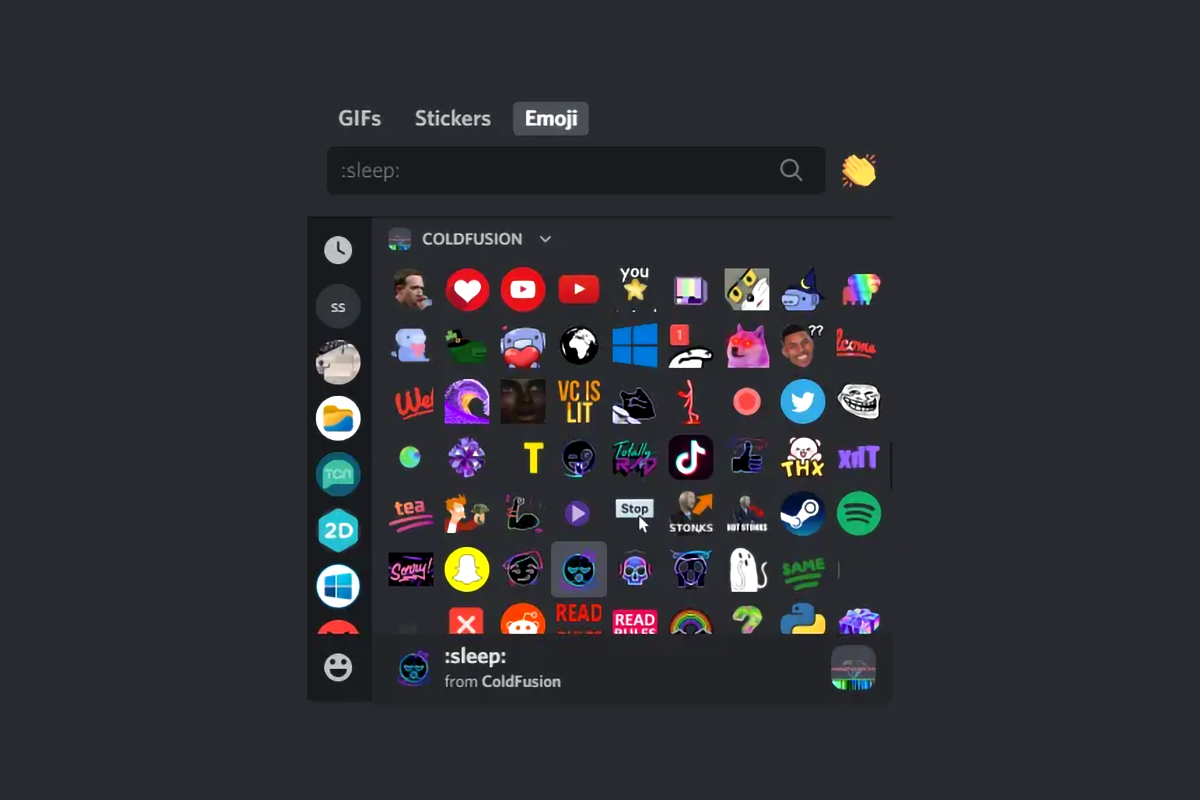
When you boost your discord server, your community gets access to custom emojis that enhance their experience in your channel. That also allows you to customize your channel, including the emojis.
Unfortunately, a server without a boost can only add a limited amount of custom emojis. However, with the level 3 boost purchase, your channel will unlock over 250 custom emojis. This specific feature will make your channel unique and engaging to your audience.
5. Enhance Your Community
A boost on your Server comes with several perks that your members will enjoy. The most notable one is that your members can earn unique badges that will help identify them as special community members. Additionally, upgrading your Discord helps improve the quality of your stream since you can get 1080p at 60fps by the time you get to level 3.
6. Increased File Upload Limit
Purchasing a boost for your channel will increase your upload limit to 100MB from 8 MB. That makes it convenient for server members to share large files, graphic representations, and video tutorials.
This feature is helpful, especially if members want to share files such as game clips and so much more. Members also get the unique opportunity to collaborate to analyze or present large files to the group.
Maximizing Your Discord Server Boost via GetAFollower

As seen from the section above, among the different levels of Server Boost, Level 3 is the most significant as it grants you access to exclusive perks like a custom splash page, server banner, and vanity URL. These features help make a server look more attractive and professional. If you desire to upgrade your Server quickly and easily, buying Discord Server Boost is a more convenient option.
To enjoy a Level 3 Boost, you have to purchase the Server boost per month on Discord’s platform. But when you buy Discord Server Boost from GetAFollower, you can get the same Level 3 Boost for three months or the Level 3 Boost for one month package at an affordable rate. Instead of paying $69.86 monthly for a Discord Server Boost, you only pay $79 for three months’ worth of Level 3 Boost.
There’s no need to wait for your server members to achieve a number of server boost levels. You can reach all three levels of Server boosting and use all features at once in just a few clicks. This especially comes in handy for communities and businesses that want to appear more established.
Conclusion
Discord Server Boosting is a feature that allows users to enhance their server experience by providing various perks and benefits. By purchasing the boost, you can grow your server and increase its visibility, attract new members to your server, and access exclusive features that your community members can enjoy.
Discord Server Boosting can significantly improve the overall experience of your server, and it is worth considering if you want to take your server to the next level. So, what are you waiting for? Buy your Discord Server boost now and start enjoying Level 3 perks instantly.